

Managing a chiropractic clinic in 2026 is still fundamentally about delivering effective patient care, earning patient trust, keeping charts clean and accurate, and keeping the practice financially sound.
Supporting those fundamentals takes more than clinical skill alone. Booking appointments, coordinating staff, maintaining records, and staying compliant all place ongoing demands on time and can quickly take over the day.
The right practice management software brings structure to that complexity. It reduces manual work, minimizes errors, and gives your team the tools they need to stay focused on patients instead of paperwork.
In this post, we’ll review the leading chiropractic practice management software options for 2026, compare their features and pricing, and explain why CaseRM stands out as an adaptive, case-centric solution built for how modern clinics actually operate.
| Software | Pricing Model | Key Capabilities | Best Fit |
| CaseRM | Solo $29/mo; Team $50/mo (unlimited users) | Cloud-based, case-centric, custom case types, integrated accounting, multi-calendar, intuitive charting | Growing clinics needing scalable customization without added complexity |
| Noterro | Core $33/mo; Plus $55/mo; Max $77/mo (1 practitioner); extra seats $13.20–$27.50 | Mobile-friendly scheduling, charting, basic billing, reminders, accounting integrations | Solo or mobile chiropractors and small clinics |
| Jane App | $54–$99/mo base; +$35–$40 per full-time practitioner | Online booking, scheduling, charting templates, payments, telehealth, basic reporting | Patient-focused clinics prioritizing online booking |
| ChiroTouch | Quote-based; Core $159/mo; Advanced $299/mo | EHR with AI (Rheo), U.S. billing and claims, compliance tools | Large U.S. clinics focused on compliance and high volume |
| Platinum System | $84.99–$284.99/mo | Server-based scheduling, SOAP notes, insurance billing, reporting | Clinics preferring server-based, structured workflows |
| PayDC | Contact for pricing | Compliance-focused EHR, insurance verification, claims scrubbing | Insurance-heavy U.S. clinics |
| ChiroFusion | $149 or $329/mo includes 1 provider; +$49/provider; $299 setup fee | Chiropractic EHR, integrated clearinghouse, billing, compliance | U.S. clinics prioritizing insurance billing efficiency |
| Zanda | Starter $19/mo; Growth $49/mo (1 practitioner) | Scheduling, reminders, SOAP templates, billing, telehealth | Small clinics needing affordable automation |
| Eclipse | Quote-based | Scheduling, billing, claims, compliance tracking | U.S. clinics prioritizing billing accuracy |
| DrChrono | Contact for pricing | Medical-grade EHR, mobile apps, telehealth, billing | Clinics needing flexible, non-chiropractic-specific EHR |
| Vagaro | Single location $30/mo for 1 bookable calendar | Online booking, reminders, payments, marketing | Small to mid-sized clinics focused on scheduling and marketing |
Note: All pricing shown reflects month-to-month subscriptions and is listed in USD unless otherwise stated.

CaseRM
CaseRM is a cloud-based platform built for clinics that deal with real-world complexity instead of idealized workflows. Instead of forcing every patient into a single linear chart or episode, CaseRM is case-centric by design, allowing each client to have multiple, independent case files managed in parallel.
This approach is especially valuable for clinics handling overlapping treatment plans, multiple payers, or long-running cases that evolve over time. Each case file maintains its own documentation, billing logic, and financial history while remaining fully integrated into clinic operations.
Accounting is embedded directly into the core of the platform, not bolted on as an add-on. Every financial transaction is recorded automatically and organized by case, reducing reconciliation work and improving billing accuracy without requiring staff to manage separate systems.
CaseRM also takes a flexible approach to scheduling. Its multi-calendar system supports unlimited calendars for clinic resources, including practitioners, rooms, and equipment, allowing clinics to model real-world operations without rigid scheduling constraints.
Despite its depth, the system remains approachable. The interface is structured to reduce administrative friction, helping teams work efficiently without relying on rigid templates or workarounds.
Key features
- Case-centric architecture with multiple case files per client
- Custom case types defined by the clinic
- Integrated accounting with automatic transaction logging
- Independent billing and documentation per case
- Multi-calendar system supporting providers, rooms, and equipment
- Intuitive charting and SOAP notes
- Paperless office and digital documentation
- Centralized address book shared across organization
- Staff scheduling and shift coordination
- Referral tracking and marketing integrations
Pricing
CaseRM offers a Solo plan at $29 per month and a flat $50 per month Team plan. The Team plan includes unlimited users, locations, calendars, and case files, with no per practitioner fees.
Best for
Clinics managing complex or overlapping cases, multiple payers, or evolving treatment plans, as well as growing or multi-location teams that need adaptable workflows.

Noterro
Noterro is designed for chiropractors and small clinics that value mobility, ease of use, and straightforward scheduling. The platform works well across phones, tablets, and desktops, making it a practical choice for practitioners who are frequently on the move or operating with lean teams.
Its feature set focuses on simplifying day-to-day clinic tasks. Online booking, automated reminders, and streamlined charting help reduce administrative overhead, while built-in billing and accounting integrations support basic financial workflows.
One of Noterro’s differentiators is its emphasis on mobile use. Features like route optimization for mobile appointments and quick access to patient information make it particularly suitable for home visits or off-site care.
Documentation is supported by AI-assisted charting tools that help speed up SOAP note creation and maintain consistency across visits. While Noterro supports multiple disciplines and core clinic functions, its workflows are best suited to simpler practice structures rather than highly customized or multi-payer case management.
Key features
- Mobile-friendly interface across devices
- Online scheduling with automated reminders
- AI-assisted charting and SOAP notes
- Built-in billing and invoicing
- Integrations with QuickBooks, Xero, and Square
- Calendar synchronization and basic reporting
Pricing
- Core: $33 per month (1 practitioner seat)
- Plus: $55 per month (1 practitioner seat)
- Max: $77 per month (1 practitioner seat)
- Additional practitioner seats: $13.20, $22.00, and $27.50 per month respectively
Best for
Solo practitioners, mobile chiropractors, and small clinics looking for a mobile-friendly system with simple scheduling, charting, and billing workflows.

Jane App
Jane App is widely known for its polished interface and patient-friendly booking experience. It is cloud-based and works consistently across desktop, tablet, and mobile devices, making it accessible for both clinic staff and patients.
The platform places a strong emphasis on online booking and front-desk efficiency. Clinics can offer branded booking pages, real-time availability, and self-scheduling, allowing patients to book appointments at any time without staff involvement.
Jane supports multi-practitioner and multi-location clinics, including scenarios where providers share treatment rooms or equipment. Its visual scheduling interface makes it easy to coordinate availability across teams, though more complex scheduling structures may require workarounds as clinics grow.
Charting is flexible and template-driven, with customizable SOAP notes, exam forms, and re-exams. Features such as voice dictation, chart duplication, and image uploads help speed up documentation. Jane also includes integrated payments, telehealth, and insurance billing support, along with operational reporting on visits, providers, and revenue.
While Jane offers a strong patient-facing experience, its pricing model scales per practitioner, which can increase costs as teams expand.
Key features
- Branded online booking and patient self-scheduling
- Real-time availability and calendar coordination
- Visual scheduling for shared rooms and providers
- Customizable SOAP notes and charting templates
- Voice dictation and image uploads
- Integrated payments and telehealth
- Insurance billing support
- Basic operational reporting
Pricing
- Balance: $54 per month for a single practitioner profile with up to 20 appointments per month
- Practice: $79 per month for one practitioner, plus $17.50 per month per part-time practitioner and $35 per month per full-time practitioner
- Thrive: $99 per month for one full-time practitioner, plus $20 per month per part-time practitioner and $40 per month per full-time practitioner
Best for
Clinics that prioritize patient-facing experience, branded online booking, and straightforward multi-practitioner scheduling, and are comfortable with per-practitioner pricing as they grow.

ChiroTouch
ChiroTouch is a chiropractic-specific EHR and practice management system built for clinics that require structured workflows, strong compliance controls, and tightly managed billing processes. It is positioned toward higher-volume and multi-provider environments where documentation consistency and regulatory requirements are a priority.
The platform combines EHR, scheduling, and billing into a single system, with a strong emphasis on U.S. insurance workflows. Automated claim submission, eligibility verification, and claim scrubbing tools are designed to reduce billing errors and improve reimbursement consistency.
ChiroTouch also includes Rheo, an AI-assisted documentation tool that helps generate and standardize SOAP notes based on clinical inputs. This can reduce documentation time, particularly in clinics with large patient volumes or standardized treatment protocols.
While ChiroTouch offers a broad and mature feature set, its structure is more rigid than case-centric systems. Clinics with complex, overlapping cases or highly customized workflows may find configuration limits as operations evolve.
Key features
- Integrated EHR, scheduling, and billing
- AI-assisted SOAP documentation using Rheo
- Automated claim submission and claim scrubbing
- Eligibility verification and compliance checks
- Diagnosis-driven coding tools
- Multi-provider and multi-location support
- Patient questionnaires and check-in workflows
Pricing
- Core: $159 per month
- Advanced: $299 per month
- All-in-one bundle plans require contacting ChiroTouch for a quote
Best for
Large or enterprise-level chiropractic clinics that prioritize compliance, insurance billing control in the US, and standardized documentation across high patient volumes.
Platinum System
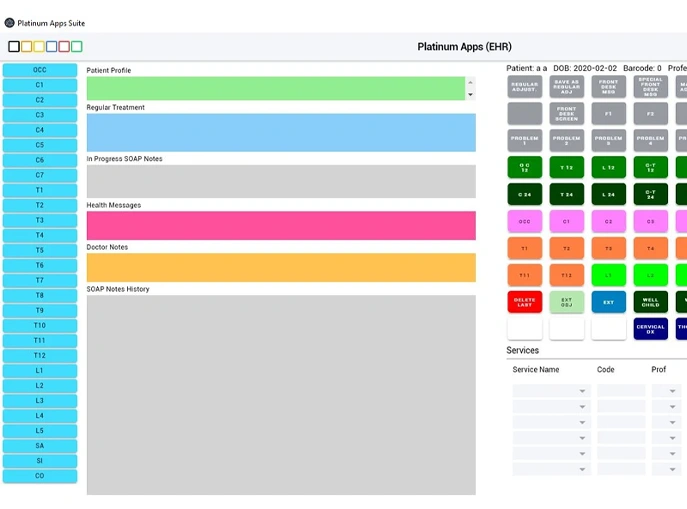
The software supports core clinic operations including appointment management, SOAP notes, insurance billing, claims tracking, and reporting. Its workflow is built to guide staff through defined steps, which can be helpful for clinics that value consistency and predictable processes.
Platinum System includes tools for managing patient records, treatment plans, billing history, and compliance documentation. Reporting features provide insight into visits, payments, and clinic activity, supporting day-to-day operational oversight.
Because it relies on local servers, Platinum System may require more IT involvement compared to cloud-based platforms. Updates, backups, and system maintenance are typically handled internally or through managed services.
Key features
- Appointment scheduling and calendar management
- SOAP notes and clinical documentation
- Insurance billing and claims tracking
- Payment processing and billing history
- Customizable forms and reports
- Document management
- Compliance tools
- Reporting and clinic statistics
- Third-party integrations
Pricing
- Starter: $84.99 per month (3 providers)
- Essentials: $209.99 per month (5 providers)
- Complete: $284.99 per month (5 providers)
Best for
Clinics that prefer server-based systems, value structured workflows, and want strong billing and documentation tools without relying on cloud infrastructure.
PayDC
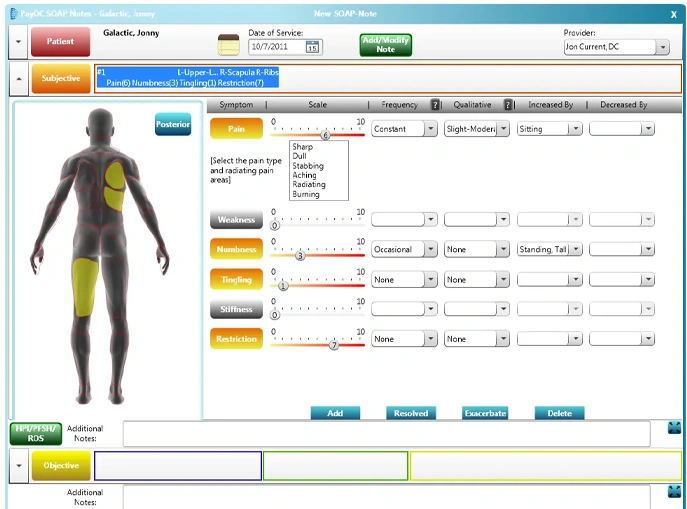
PayDC is a chiropractic-focused practice management system built around insurance billing, documentation accuracy, and compliance. Its design prioritizes keeping clinical notes, coding, and claims tightly aligned, which is especially important for clinics that work with U.S. insurance-driven environments.
The platform brings scheduling, SOAP notes, billing, and insurance workflows into a single cloud-based system. Daily documentation feeds directly into claim generation, helping reduce discrepancies between treatment records and submitted claims.
PayDC includes real-time insurance verification and eligibility checks, along with tools designed to support audit-ready documentation. Its workflows favor structure and consistency, which can be an advantage for clinics with standardized treatment and billing processes.
While PayDC covers core operational needs, its flexibility is more limited compared to case-centric or highly customizable platforms. Clinics with complex, overlapping cases or non-standard billing structures may find constraints as their operations evolve.
Key features
- Automated claim generation from clinical notes
- Insurance verification and eligibility checks
- Compliance-focused SOAP documentation
- Integrated clearinghouse
- Scheduling and patient management
- Patient portal and self check-in
- Credit card processing
- Real-time billing dashboards
Pricing
Contact PayDC for pricing.
Best for
Chiropractic clinics operating in U.S. insurance-driven environments that need strong compliance controls and audit-ready billing workflows.
You may also like: Turning Numbers into Insight: Why Dashboards Matter in Your Practice.
ChiroFusion
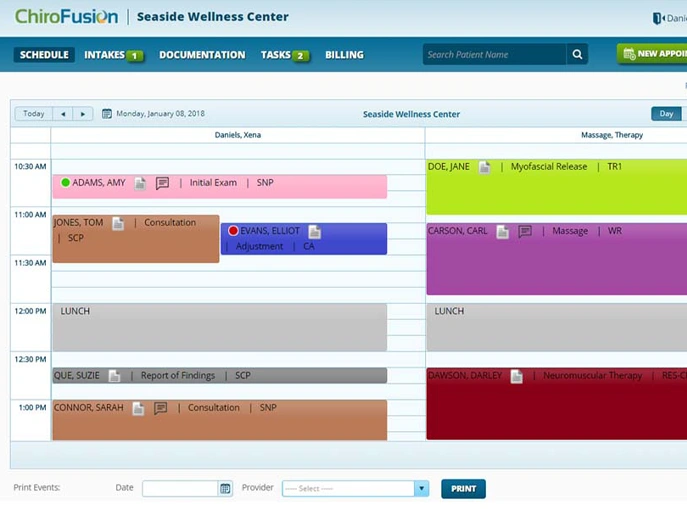
ChiroFusion is a cloud-based chiropractic EHR designed to streamline documentation, scheduling, billing, and patient management for clinics that prioritize insurance efficiency. The platform focuses on keeping clinical notes, billing data, and claims closely aligned to reduce errors and delays.
One of ChiroFusion’s key differentiators is its fully integrated clearinghouse. Claims are submitted directly from the system without relying on third-party services, which can simplify billing workflows and improve turnaround times. The platform reports a long track record of processed insurance claims, reinforcing its billing-first orientation.
ChiroFusion includes chiropractic-specific SOAP notes, online intake workflows, scheduling, and patient communication tools. Its interface is straightforward and optimized for speed, making it easier for staff to move through daily tasks without navigating unnecessary complexity.
While ChiroFusion handles insurance billing efficiently, its workflow structure is more standardized. Clinics with complex case structures, multiple concurrent payers, or highly customized operational needs may encounter limitations as they scale.
Key features
- Chiropractic-specific SOAP notes and documentation
- Integrated billing and claims submission
- Built-in clearinghouse
- Scheduling and shared calendars
- Compliance and reporting tools
- Online intake and patient portal
- Electronic payments
Pricing
- Essential: $149 per month (includes 1 provider)
- Complete: $329 per month (includes 1 provider)
- Additional providers: $49 per month each
- One-time setup fee: $299 due at signup
Best for
U.S.-based chiropractic clinics that want efficient insurance billing and claims processing through a tightly integrated system.
Zanda
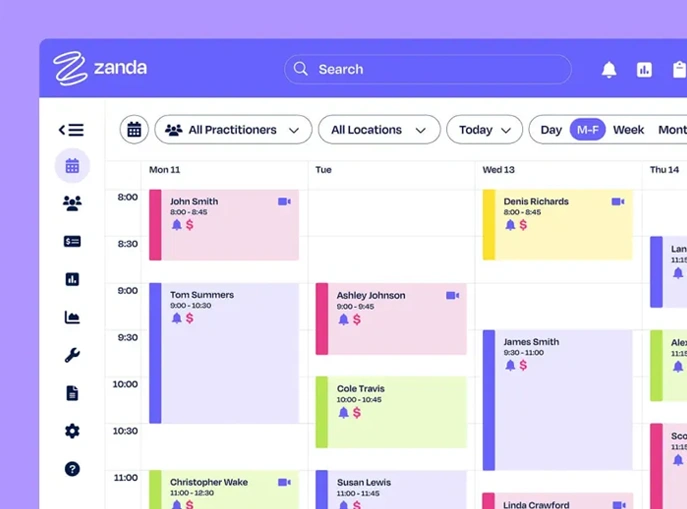
Zanda is a cloud-based practice management platform focused on automation and ease of use for small chiropractic clinics. Its primary goal is to reduce administrative workload by tying together scheduling, reminders, documentation, and billing into a simple, accessible system.
The platform emphasizes communication and follow-ups. Automated email and SMS reminders help reduce no-shows, while integrated invoicing allows clinics to track payments without switching between tools. Zanda also supports telehealth, making it useful for clinics offering occasional virtual consultations.
Charting is handled through customizable SOAP templates, allowing chiropractors to document care efficiently without complex configuration. An AI assistant is included to support routine administrative tasks, helping smaller teams save time on repetitive work.
Zanda is not designed for complex case management or advanced insurance workflows. Instead, it prioritizes affordability and straightforward operation, making it easier for small teams to stay organized.
Key features
- Centralized scheduling with calendar synchronization
- Automated SMS and email appointment reminders
- Integrated billing and invoicing
- Customizable SOAP templates
- Patient recall and outcome tracking
- Telehealth for video consultations
- AI assistant for routine administrative tasks
Pricing
- Starter Plan: $19 per month (1 practitioner)
- Growth Plan: $49 per month (1 practitioner)
Best for
Small chiropractic clinics looking for affordable automation for scheduling, reminders, basic documentation, and billing.
Eclipse
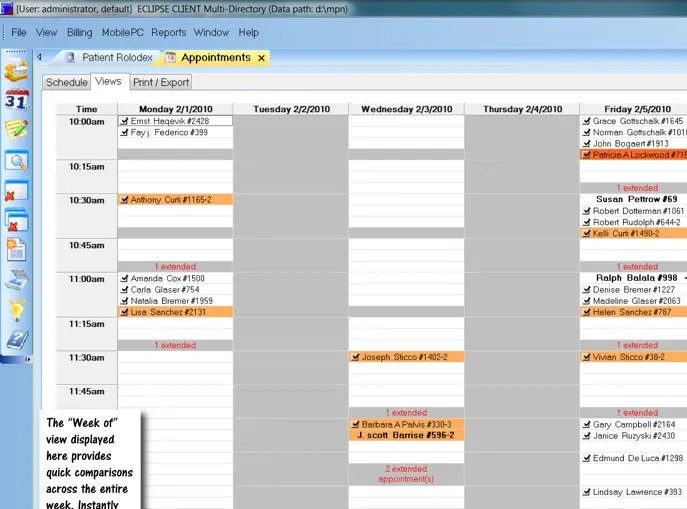
Eclipse is a chiropractic practice management system focused on documentation accuracy, billing consistency, and compliance driven workflows. It is commonly used by clinics that manage high visit volumes and need strong alignment between clinical notes and claims.
The platform centralizes scheduling, SOAP notes, billing, and claims processing into a single system. Its documentation tools are designed to keep treatment records and billing codes synchronized, helping reduce discrepancies that can trigger claim issues or audits.
Eclipse includes compliance tracking and reporting features that support clinics working within structured billing environments. Customizable forms, document management, and reporting tools allow clinics to maintain organized records across large caseloads.
While Eclipse provides solid operational control, its workflows are more rigid than case-centric platforms. Clinics with complex or non standard case structures may find customization limits as operational needs evolve.
Key features
- Appointment scheduling and calendar management
- SOAP notes and clinical documentation
- Billing, invoicing, and claims processing
- Compliance tracking and reporting
- Customizable forms and document management
- Patient portal
- Reporting and operational analytics
Pricing
Quote based pricing. Contact Eclipse for details.
Best for
U.S. based chiropractic clinics that prioritize billing accuracy, compliance, and operational consistency in high volume or insurance driven environments.
DrChrono
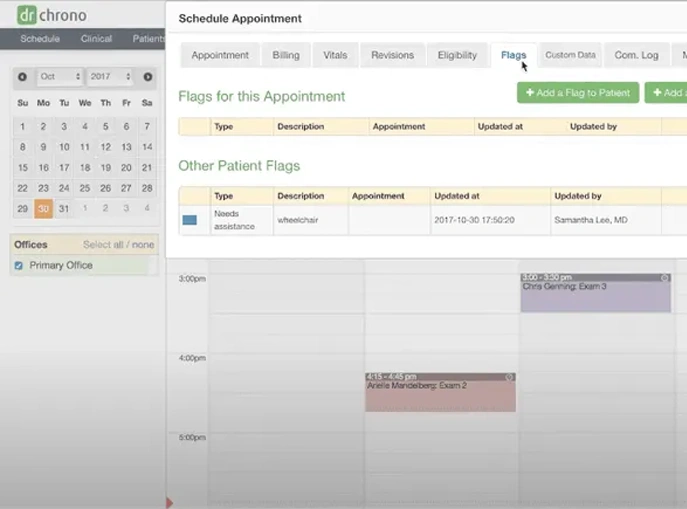
DrChrono is a cloud-based EHR and practice management platform used across multiple healthcare specialties. It is not chiropractic-specific, but it offers flexible workflows and specialty templates that some chiropractic clinics adapt for their needs.
The platform combines scheduling, charting, billing, telehealth, and patient communication into a single system. Its mobile support is a standout feature, with dedicated iPhone and iPad apps that allow providers to chart, review schedules, and access patient records on the go.
DrChrono supports insurance billing and eligibility checks and integrates with a large network of laboratories, allowing providers to order tests and receive results directly within the patient chart. For clinics that prefer to outsource complex billing tasks, revenue cycle management services are available through higher-tier plans.
Because DrChrono is designed for a wide range of medical practices, chiropractic workflows often require configuration and adaptation. Clinics looking for chiropractic-specific case structures or insurance logic may encounter limitations without customization.
Key features
- Cloud-based EHR with flexible workflows
- Specialty templates and customizable charting
- Integrated scheduling and patient messaging
- Telehealth and virtual visits
- Insurance eligibility checks and claims support
- Mobile apps for iPhone and iPad
- Laboratory integrations
- Optional revenue cycle management services
Pricing
Contact DrChrono for pricing.
Best for
Chiropractic clinics that want a flexible, medical-grade EHR with strong mobile support and are comfortable adapting workflows to a non chiropractic-specific platform.
Vagaro
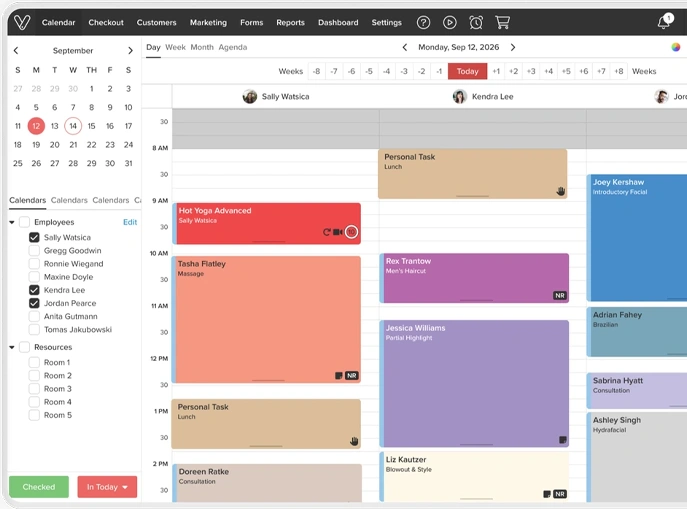
Vagaro is a scheduling and business management platform commonly used across wellness industries, including chiropractic, massage, and personal care services. Its strengths lie in appointment booking, reminders, payments, and basic marketing.
The platform offers branded online booking pages that allow patients to self-schedule appointments at any time. Automated email and SMS reminders help reduce no-shows, while integrated payment processing enables clinics to collect payments without separate merchant accounts.
Vagaro includes basic marketing tools such as email campaigns, promotions, and client outreach, which can help clinics stay connected with their patient base. Intake forms can be customized and submitted online, supporting paperless front-desk processes.
While Vagaro covers essential administrative needs, it is not built for chiropractic-specific charting, case management, or insurance-heavy billing. Clinics with more advanced clinical or compliance requirements may need to pair it with additional systems.
Key features
- Online booking with branded clinic pages
- Automated appointment reminders
- Integrated payment processing
- Email and SMS marketing tools
- Customizable intake forms
- Desktop and mobile access
Pricing
- Single location: $30/mo for 1 bookable calendar
- Multiple locations: Contact Vagaro for pricing
Best for
Small to mid-sized chiropractic clinics that prioritize online booking, reminders, payments, and basic marketing over advanced clinical and billing workflows.
How to Choose the Right Practice Management Software for Your Chiropractic Clinic
Choosing practice management software is a long-term decision. The right system supports how your clinic actually operates and adapts as complexity increases. The wrong one adds friction, forces workarounds, and becomes something your team works around instead of through.
When evaluating your options, focus less on feature lists and more on how well the system aligns with real clinic workflows.
Workflow fit over feature count
The most important question is whether the software reflects how your clinic runs day to day. Systems built around rigid, linear workflows often struggle as clinics grow, add providers, or manage overlapping cases.
Look for software that can:
- Support multiple case files per client when treatment or billing needs differ
- Adapt workflows without forcing templates or one-size-fits-all structures
- Handle complex scheduling involving practitioners, rooms, and shared resources
- Reduce manual coordination between clinical, scheduling, and billing tasks
Software that is case-centric by design tends to scale more naturally as clinics evolve.
Operational clarity and financial organization
Billing and documentation should reinforce each other, not live in separate silos. When financial activity is tightly connected to case files and clinical work, clinics spend less time reconciling data and correcting errors.
Evaluate whether the system:
- Keeps documentation and billing aligned at the case level
- Organizes financial activity automatically
- Provides a clear view of what has been billed, paid, and outstanding
Integrated accounting and structured case organization reduce administrative overhead over time.
Scheduling that matches reality
As clinics grow, scheduling becomes less about appointments and more about coordinating resources. Systems that treat scheduling as a simple calendar often break down when multiple providers, rooms, or equipment are involved.
Look for platforms that:
- Support multiple calendars tied to real clinic resources
- Allow flexible scheduling without artificial limits
- Scale from solo practice to multi-location operations
Support and long-term adaptability
Practice management software is not a short-term tool. The value comes from how well it continues to support your clinic as needs change.
Consider whether the vendor:
- Provides structured guidance and onboarding
- Demonstrates a clear understanding of complex clinic operations
- Builds around adaptability instead of locking clinics into rigid workflows
Takeaway
The best practice management software does not force your clinic to change how it works. It provides structure where needed and flexibility where it matters.
CaseRM is built around this principle. Its case-centric architecture, integrated accounting, and flexible scheduling model align with the operational realities of clinics managing complex cases and evolving workflows. It brings clarity and cohesion to daily operations without adding layers of administration.
Choosing software that adapts with your clinic is one of the most practical investments you can make in long-term efficiency and stability.
FAQs
Below are answers to some of the most common questions chiropractors ask when evaluating practice management software.
Why is practice management software essential for today’s chiropractors?
Practice management software brings core clinic operations into one place, including scheduling, billing, clinical documentation, and patient communication. When these functions are coordinated, clinics spend less time on administrative tasks and more time focused on patient care.
A well-designed system also improves consistency across documentation and billing, reduces manual errors, and helps teams stay organized as patient volume and operational complexity increase.
Should chiropractors choose cloud-based software over on-premise solutions?
Cloud-based software offers practical advantages for many modern clinics. It allows access from any device with an internet connection, reduces the need for local servers and IT maintenance, and ensures updates and backups are handled centrally.
For clinics operating across multiple locations or supporting flexible work arrangements, cloud-based platforms provide the accessibility and scalability that on-premise systems often struggle to match.
How do electronic health records (EHRs) work within chiropractic software systems?
Electronic health records store patient information digitally, including clinical notes, treatment history, and billing data. In integrated systems, EHRs work alongside scheduling and billing tools, allowing information to flow through the clinic without duplication.
When documentation, scheduling, and billing are connected at the case level, clinics can reduce inconsistencies and improve overall workflow efficiency.
Are there specific regulations that affect chiropractic software use?
Yes. Chiropractic clinics must comply with applicable privacy and data protection regulations when handling patient information. These may include HIPAA in the United States, PIPEDA in Canada, GDPR in parts of Europe, as well as provincial or regional privacy requirements.
Choosing software designed for healthcare use helps clinics manage patient data responsibly and maintain appropriate safeguards as part of their daily operations.
