Every time someone books an appointment, your office admin needs a quick answer. Is this client booking under a treatment plan or a sold package? If so, how many visits are left, and how much budget remains?
Good treatment plan management keeps that answer current. It updates as appointments arrive and as charges or invoices are created against the plan. Staff need to see what’s been used and what’s left for each service or product, not just whether a plan is “active.”
In CaseRM, treatment plans live inside the client’s case file, so providers, office admins and managers all work from one place. To review usage, staff expand a plan right in the list and see its consumption summary, remaining visits and remaining budget.
Here’s how that workflow supports appointment scheduling, treatment tracking, patient care coordination and billing clarity.
What a treatment plan should include
A useful plan has two layers.
Plan-level details
- Description and plan number
- Plan date
- Duration in weeks
- Status
- Who created the plan and who completed it
Service lines
- Each proposed service
- The number of sessions planned for that service
- The provider who will deliver it
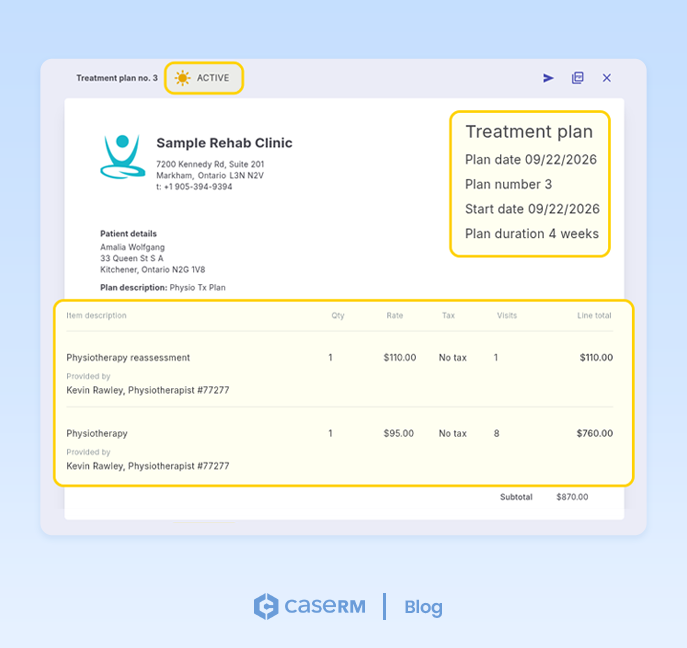
Some plans cover a single discipline. Others mix several. A client might have an initial assessment, eight physiotherapy sessions and four massage sessions, all under one plan. Each line needs its own count, or you can’t tell what’s actually been used. Naming the provider on each line also shows who’s responsible for which part of the plan.
Recording who created the plan and who completed it adds accountability. Anyone reviewing the file can see who set it up and who signed it off.
A quick note on treatment plan templates: most clinics build similar plans again and again, such as a standard post-surgery physio plan or a six-week massage program. Treatment plan templates let you set those up once and reuse them, saving time and keeping plans consistent across providers. Templates are on our roadmap for CaseRM, and they’ll fit naturally with the structure above.
A lifecycle that controls operations
Every plan in CaseRM follows a clear lifecycle: Draft, Active, Completed or Prematurely Closed. It’s more than paperwork, because the status controls what staff can do.
A plan starts as a draft. You build it, assign a provider to each service line and confirm the services and session counts. Once it becomes active, it’s ready to use. Only active plans can be used to book appointments, record charges and create invoices. That means a draft can’t be booked or billed by accident, and staff always work from a confirmed plan.
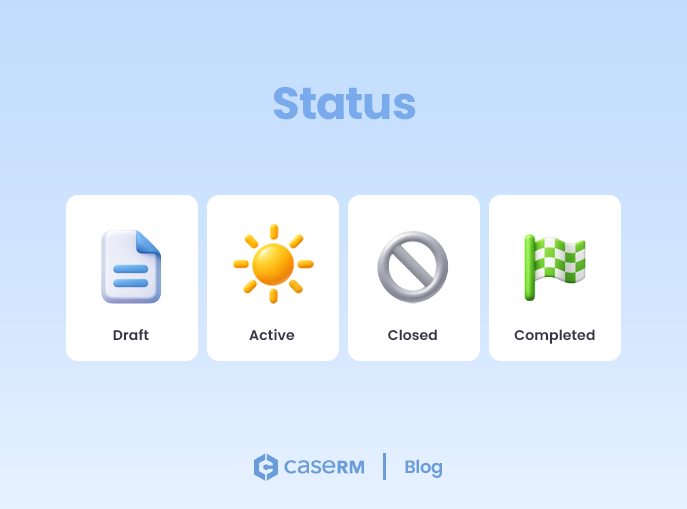
From there, a plan ends in one of two ways:
- Completed, when the planned treatment has been delivered.
- Prematurely closed, when treatment stops before the plan runs its course.
Either way, the plan drops out of the booking and billing options. Staff no longer scroll past old, fully used plans to find the right one.
Check entitlement during the booking conversation
The best time to check entitlement is while you’re still on the phone, or at the front desk, arranging the appointment.
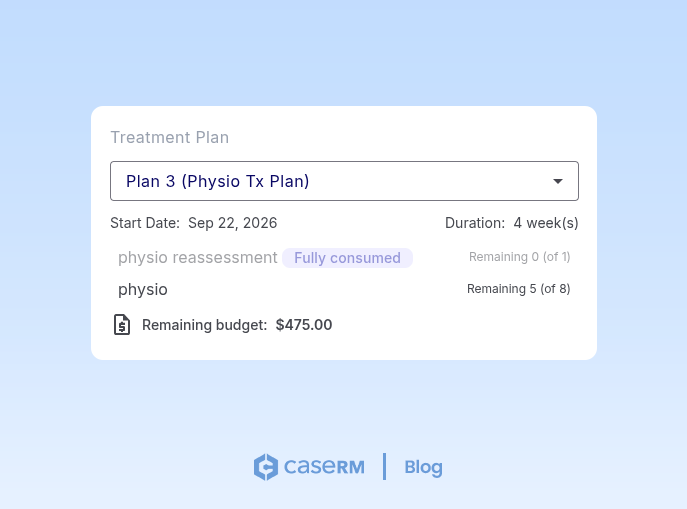
Picture a client asking for another massage. Their plan includes several services, but only one massage visit remains. The admin needs that service-level answer, not just confirmation that an active plan exists.
In CaseRM, staff select the client’s case file, find the active plan, confirm the remaining visits per service and check the remaining budget before finalizing the booking. This is where treatment plans stop being just records and start doing real work.
Booking is not consumption
A booking links an appointment to a plan. Consumption happens when that linked appointment is marked arrived.
The distinction matters for treatment tracking:
- Scheduled visits show expected demand.
- Arrived visits show actual usage.
- Remaining visits show current entitlement.
When your team keeps these three apart, plans are easier to read and scheduling decisions are more accurate.
Track remaining visits per service line
Service-level visibility is the heart of treatment tracking. Here’s what it looks like:
| Service line | Planned | Consumed | Remaining |
|---|---|---|---|
| Physiotherapy | 8 | 5 | 3 |
| Massage | 4 | 3 | 1 |
| Reassessment | 2 | 0 | 2 |
| Total | 14 | 8 | 6 |
This plan has six visits left overall, but only one massage visit. A single total isn’t enough to schedule safely. For both care plans and treatment plans, remaining visits by service line is the view that matters most.
This kind of progress tracking also helps clients. Seeing “five of eight sessions done” is motivating, and it gives providers a natural moment to talk about how treatment is going.
Keep remaining budget visible—and clearly defined
CaseRM calculates and displays the remaining budget for the selected plan, so your team can answer budget questions during booking and case review.
Remaining values change whenever activity is recorded against a plan. In practice, that includes:
- Appointment activity linked to the plan
- Financial activity tied to plan usage, including charges and invoices
The takeaway is simple: review the plan’s current consumption summary every time you schedule a new appointment. It keeps treatment tracking real-time, speeds up booking and cuts down on booking and billing errors.
Limit financial visibility when needed
Not every role needs to see the money.
A common best practice is to show providers only the remaining visits per service during booking and appointment review. Authorized users then handle budget, medical billing and reconciliation separately. This keeps front-desk workflows focused and supports clean role-based access in your practice management software.
Manage plans inside the case file
Office admins and managers often need to review plan consumption, not just create treatment plans.
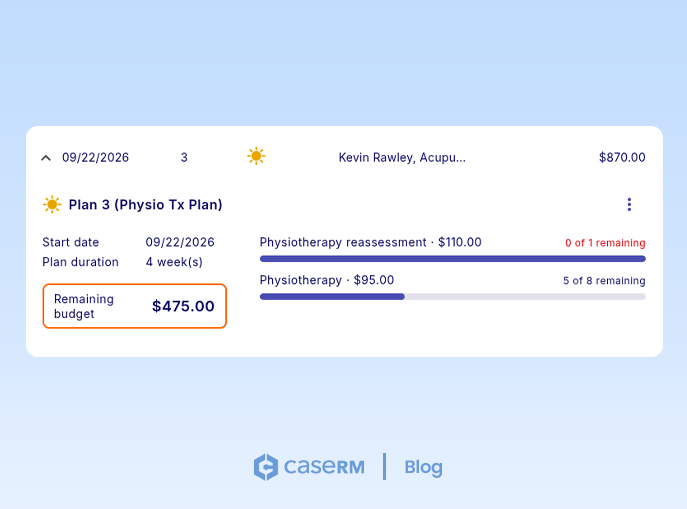
In CaseRM, they open the client’s case file, view the full list of plans and expand any plan to see its consumption overview, remaining visits and remaining budget. That makes the daily questions quick to answer:
- Which active plans are close to running out?
- Which service lines still have visits available?
- Which plans need follow-up before more appointments are scheduled?
Keeping this review in one place means less jumping between tools. Plan history, status and usage stay tied to the same EHR, document management and health records context. It’s also what good patient records management looks like day to day: everything about a client’s care in one file, not scattered across spreadsheets and inboxes.
Reassessments and continuity of patient care
Providers can list treatment plans that are approaching reassessment, based on predefined criteria. This lets your team review care plans before entitlement runs out, update them on time and keep patient care continuous.
It also keeps your case notes in step with the plan. When a provider writes up a session, they can see where the client sits in the plan. In EHR workflows, that improves alignment between treatment plans, clinical documentation and progress notes.
Keep billing aligned with active treatment plans
Charges and invoices created by plan are easier to trace.
When booking, charge entry and invoicing are limited to active plans, billing stays aligned with care that’s actually in progress. Completed and closed plans stay available for reference in health records, but they aren’t used for new transactions.
Why timely completion and closure matter
Completing or prematurely closing plans on time keeps the system tidy. Timely closure:
- Removes ended plans from active selections
- Reduces booking mistakes
- Keeps reporting clearer
- Preserves a reliable treatment plan history for document management and review
Closing a plan is an operational control, not just an admin chore.
Practical checklist for teams
Use this quick check to improve consistency:
- Confirm required plan-level fields are complete, including start date and created-by/completed-by.
- Confirm each service line has a quantity and an assigned provider.
- Verify that users can review remaining visits per service before booking.
- Make sure only active plans appear for booking, charge entry and invoicing.
- Review the current consumption summary before scheduling additional visits.
- Define reassessment criteria and review them regularly.
- Confirm charges and invoices are consistently entered by plan for billing traceability.
What to look for in treatment plan management software
When you’re evaluating treatment plan management software, look for practical features tied to daily operations. Whether you’re shopping for patient case management software or a broader practice tool, this table is a good starting point:
| Need | Capability |
|---|---|
| Prevent invalid booking | Active-only plan selection |
| Improve booking accuracy | Remaining visits per service line |
| Support financial clarity | Remaining budget visibility by plan |
| Control role visibility | Visits-only view where needed |
| Improve proactive review | Reassessment list using predefined criteria |
| Keep finance traceable | Charges and invoices by plan |
| Track sold packages | Reuse the treatment plan structure for package consumption |
| Save setup time | Treatment plan templates for common programs |
| Reduce admin friction | Case-file-based appointment and calendar management |
These are also core requirements in care management software, practice management tools and EHR-connected practice management software.
Final takeaway
Treatment plans work best when you treat them as live operational records.
With a case-file-centered workflow, your team can keep treatment tracking current, check remaining visits and budget in seconds, make confident scheduling decisions, support clinical follow-up and keep billing aligned with active care.
That’s what turns treatment plans and care plans into reliable tools for patient care, operational clarity and consistent execution, from patient intake through closure.