Appointments are where most clinic systems either hold together or quietly fall apart.
A single booking affects availability, case files, billing rules, appointment reminders, and follow-up. Multiply that by dozens of patients, multiple providers, shared rooms, and different payers, and scheduling stops being a simple task. It becomes the operational core of the clinic’s appointment booking system.
This article outlines what effective scheduling looks like in professional physiotherapy and massage therapy clinics, and how appointment scheduling, case-based visits, billing workflows, and appointment reminders are expected to work together in day-to-day operations.
What Modern Physio and Massage Clinics Expect from Appointment Software
Expectations around appointment scheduling software have changed. Clinics no longer evaluate tools as standalone calendars. They expect appointment software to support the full lifecycle of a visit, from booking through billing and payment.
This shift spans physiotherapy clinics, massage therapy practices, and multidisciplinary clinics. Front-desk staff, providers, and managers rely on the same system throughout the day. The software has to support each role directly, without forcing workarounds.
Why Scheduling Matters Beyond Booking
In physiotherapy and massage therapy clinics, scheduling decisions affect far more than availability. Appointments determine how visits are tracked under case files, how charges are applied, how appointment reminders are sent, how client data is accessed, and how revenue is captured.
Weak scheduling tools push staff into manual work. Strong appointment scheduling software reduces avoidable steps, so teams spend less time fixing scheduling issues and more time supporting both existing and new clients.
What Best-in-Class Massage and Physiotherapy Appointment Software Actually Delivers
Well-designed appointment software does more than reserve time on a calendar. It supports overlapping schedules, shared resources, multiple payers, frequent rescheduling, and high daily volume without fragmenting workflow or increasing administrative effort.
That operational reliability separates professional practice management software from basic booking tools.
A Scheduling Calendar That Keeps Up with Daily Clinic Demand
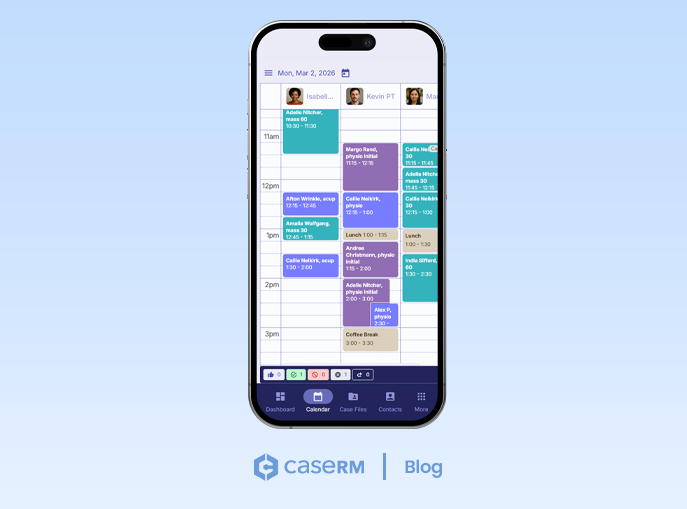
Booking Appointments from Any Device
Modern clinics schedule appointments from multiple devices throughout the day. Front-desk staff, providers, and managers may all interact with the calendar from different locations. Appointment booking must work consistently across desktop, tablet, and smartphone.
A user-friendly interface is no longer optional. It is a baseline requirement for appointment scheduling software used in health and wellness clinics.
A Fast, Flexible Scheduling Grid
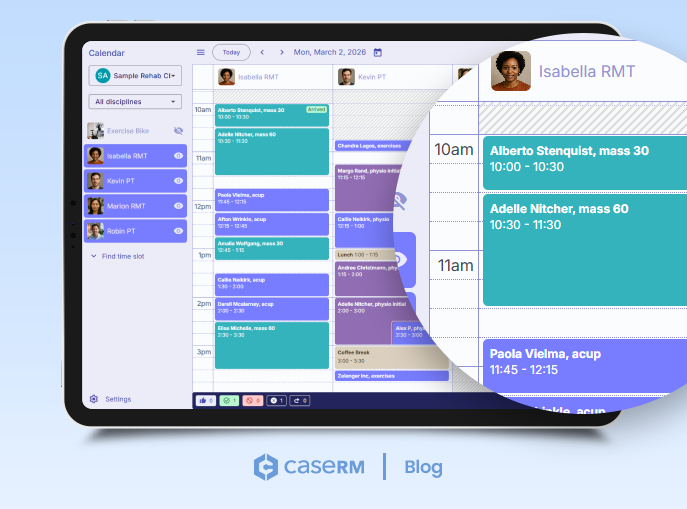
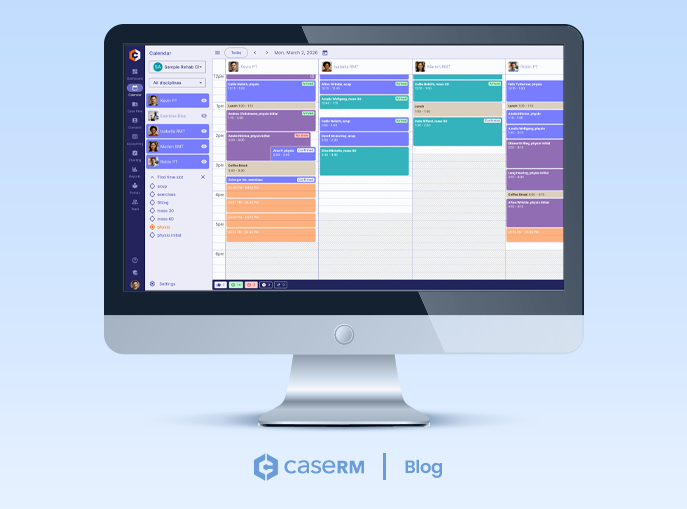
The CaseRM calendar presents a live grid where each column represents a provider, room, or piece of equipment. Shift availability is visible for the selected date, and only calendars with active shifts appear by default. This keeps busy schedules readable even at peak times.
A left-side panel gives staff direct control to:
- switch between clinic locations
- filter calendars by professional discipline
- toggle individual calendars on or off
- access calendar and scheduling settings
- find available time when schedules are nearly full
The right-side panel slides out when booking or selecting an appointment, keeping booking actions, client profiles, and case details in one place.
Case Context Visible While Booking
Unlike generic massage appointment software, CaseRM surfaces case context at the point of appointment booking. Staff see key client profile details at a glance, including contact details, last visit date, outstanding balances, payer information, and prior no-shows.
Appointments provide direct access to the associated case file, eliminating the need to navigate to the Case Files module and manually search for it. This reduces the time spent locating records.
Booking, Changing, and Planning Appointments Without Friction
Clinic schedules change constantly. Clients reschedule, providers run late, follow-up visits need to be planned quickly, and new clients must be booked for initial assessments. Appointment scheduling software must handle this level of day-to-day change as part of normal operations.
Overlapping Appointments and Flexible Sessions
Overlapping appointments don’t require a special mode or additional steps. From the calendar grid, staff click into a visible portion of a time slot where another appointment already exists and begin booking immediately.
This flexibility differentiates well-designed, professional therapy appointment software from basic massage booking apps built around rigid time blocks.
Copying, Moving, and Repeating Appointments
Appointments can be copied, moved, or repeated using a consistent flow. For ongoing treatment plans, staff schedule recurring visits in a single sequence, validate availability for each date, and confirm all appointments at once.
These are core features in modern massage scheduling software used in high-volume clinics.
Blocking Time Directly in the Calendar
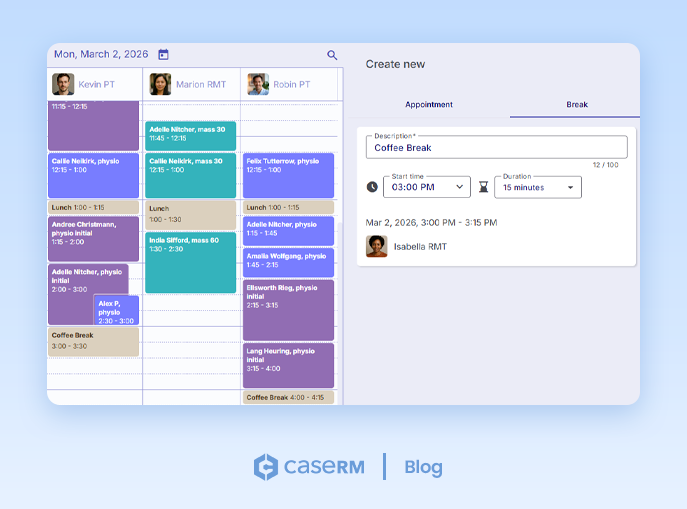
Time blocking happens directly in the calendar grid. Staff add breaks the same way they book appointments by clicking into the grid and entering break details.
Breaks can be edited or removed just as easily. This calendar-native approach removes the need to navigate setup screens and keeps availability accurate.
Finding Open Time in a Nearly Full Schedule
When schedules are nearly full, the Find Time Slot feature highlights available openings for selected session directly in the grid. Staff schedule appointments from the highlighted times without scanning manually.
This capability matters in physiotherapy appointment software, where follow-up visits must be booked efficiently to maintain continuity of care.
Keeping Appointments Clear, Accurate, and Easy to Manage
An appointment is more than a placeholder. It represents a workflow that must stay accurate from booking through completion.
Appointment Status Flow from Booked to Paid
Appointments move through a defined lifecycle: Booked, Confirmed, Arrived, and Paid. The system also supports No Show, Canceled, and Rebooked outcomes.
Most statuses can be rolled back when corrections are required. Rebooked and Canceled act as final states.
Handling No-Shows, Cancellations, and Re-bookings
No-shows and cancellations are handled explicitly, allowing clinics to apply policy consistently. Many basic massage booking apps lack this level of control.
Toggling Appointment Visibility by Status
At the bottom of the calendar grid, a status bar provides a live summary of the day’s appointments. It displays the number of appointments in each status, along with the total number of appointments booked for the selected day.
These status labels are not just indicators. Each one functions as a toggle button that controls visibility directly in the calendar grid. Staff can show or hide appointments by status with a single click.
By default, Canceled and Rebooked appointments are hidden to keep the schedule focused on active visits. When needed, staff can reveal them instantly using the toggle. The same interaction makes it easy to isolate specific views. For example, by turning off all other statuses, staff can see only Arrived appointments for the day.
This interaction happens entirely within the calendar. There are no extra menus, filters, or modal dialogs to open. Visibility changes take effect immediately, making it practical to use throughout the day as schedules evolve.
Built-In Audit Trails for Every Appointment
Every appointment maintains a complete audit trail. Status changes, edits, reschedules, and billing actions are logged with timestamps and user attribution. This level of traceability is expected in professional therapy appointment software.
Case-Based Scheduling for Real-World Treatment Scenarios
Booking Appointments by Case, Not Just by Patient
CaseRM is case-centric by design. Appointments are booked against specific case files rather than generic client records. Visits remain tied to the correct documentation, billing rules, and payers.
This distinction is critical in physiotherapy appointment software used for motor vehicle accident and workers’ compensation cases.
Managing Multiple Active Cases for the Same Client
A single client may attend appointments under different cases on different days. Each visit remains correctly linked to its case and billing logic, something generic massage booking software often struggles to support.
From Appointment to Payment: Supporting Daily Front-Desk Workflows
The front desk coordinates scheduling, billing, and payment throughout the day. Appointment scheduling software must support that flow without forcing staff to move between disconnected screens.
Arrive, Bill, and Collect: A Single Workflow
Front-desk staff repeat the same cycle throughout the day: mark attendance, bill the visit, and collect payment.
When an appointment is marked Arrived, the system prompts staff to confirm adding the default charges associated with the scheduled session. Those charges appear immediately and remain editable.
Creating an invoice surfaces any uninvoiced charges on the same case file, allowing staff to include them before finalizing the bill. Once invoiced, payments can be recorded directly, with outstanding invoices visible for reference.
Invoices remain accessible from the appointment itself, reducing time spent navigating between records and keeping front-desk work moving.
This reflects the practical ABCs of daily operations—Arrive, Bill, Collect—handled as one continuous workflow.
Applying Charges Automatically from Appointments
The Arrive step is fast for a simple reason: charges are driven by the session.
Each appointment session can be configured with one or more billing items. Those billing items become the default charges for the visit. When a patient arrives, marking the appointment Arrived triggers those billing items to be applied to the case file automatically. There’s no manual re-entry.
Clinics still retain full flexibility once charges are added:
- Charges can be adjusted or removed if the visit differed from the planned session.
- Additional charges can be added for services or products provided during the visit.
- The billing provider can be changed per charge when needed.
By default, the system assigns the billing provider based on the calendar where the appointment was booked. If that needs to change, staff can edit the charge, select a different billing provider, and save.
This approach keeps billing consistent when visits follow the planned session, while still accommodating real-world variation without disrupting workflow.
Billing No-Shows and Late Cancellations
Charges can be added to No Show and Canceled appointments, allowing clinics to invoice according to established policy.
Setting Up Calendars, Availability, and Online Booking
Configurability allows appointment scheduling software to adapt as clinics grow and change.
Calendars for Providers, Rooms, and Equipment
The system supports three types of calendars, one for each schedulable resource: individual providers, rooms, and equipment. Clinics can create an unlimited number of calendars to reflect how their practice is structured.
Provider calendars are created automatically when new team members are added, removing setup steps during onboarding. Clinics can also create additional calendars for existing providers when needed—for example, when a provider works across multiple locations and requires separate schedules at each site. This makes it possible to manage shifts and availability independently per location while keeping booking organized.
Additional calendars can be created for rooms and equipment as well. Each calendar is assigned a location, a calendar type, and the professional disciplines it supports.
Calendars can be enabled for online booking, forming the foundation of a scalable booking system that grows with the clinic.
Managing Locations, Disciplines, and Access
Each calendar in the system is explicitly configured, not generic.
Every calendar is assigned to a specific clinic location, ensuring appointments only appear where services are actually delivered. This matters in multi-location practices, where availability, providers, and resources differ from site to site.
Calendars are also configured to accept sessions from one or more professional disciplines. By listing the disciplines a calendar supports, the system controls which appointment types can be booked into that calendar. If a session’s discipline doesn’t match, it can’t be scheduled there. This prevents booking errors without relying on staff judgment alone.
Access is managed just as deliberately. Management roles have visibility across all calendars, giving them oversight of clinic operations. Providers, on the other hand, only see and book into calendars where they’ve been explicitly granted access. This keeps schedules focused and avoids unnecessary exposure to unrelated bookings.
Together, location assignment, discipline filtering, and access control ensure that each calendar reflects how the clinic actually operates—supporting multi-provider, multi-discipline practices without sacrificing clarity or control.
Shift Scheduling and Availability Planning
Shifts are where most appointment scheduling software either stays clean and predictable or becomes a mess of exceptions. CaseRM treats shifts as a first-class tool, so clinics can manage calendar shifts like a pro instead of relying on spreadsheets or memory.
In Calendar Settings, Shifts are managed on a weekly view. The system lists active calendars with their shift schedules one week at a time, defaulting to the current week. Staff can move forward or backward week by week or jump to any week using a date picker. This makes it practical to plan ahead without losing track of what’s already published.
Creating shifts is straightforward. Staff navigate to the day and calendar they need, click Add shift, and set the start and end time. Breaks can be built directly into a shift by adding one or more break blocks with their own start and end times. This keeps availability accurate without forcing staff to manually block time on the calendar afterward.
Where CaseRM becomes noticeably faster is repeat scheduling. Shifts don’t have to be rebuilt week after week. Staff can set a shift to repeat by choosing the days of the week and the number of weeks to repeat. The same shift pattern can also be applied to multiple calendars at once, so clinics can roll out schedules across providers, rooms, or equipment in a single pass.
Shifts also control the calendar’s visible hour range. Staff can set the start and end time shown in the scheduling grid, so the calendar displays the hours the clinic actually operates instead of forcing a one-size-fits-all view.
The result is simple: your appointment booking stays aligned with real availability, your online booking reflects actual capacity, and staff spend less time patching schedules after the fact.
Customizing Calendars for Online Booking
Preparing a calendar for online booking involves more than deciding which appointments clients can book. It requires guardrails that protect clinic operations, provider schedules, and front-desk workflows.
CaseRM provides calendar-level settings that control how and when clients can book appointments online.
Lead time requirements define how much notice is required before an appointment start time. This prevents last-minute bookings that can catch staff off guard and ensures providers have adequate time to prepare. Lead time is especially important in busy clinics where schedules change quickly throughout the day.
Buffer time between appointments enforces short breaks before or after visits. This is particularly important for massage therapists, who need time to change linens, complete progress notes, and reset the treatment space. Buffer rules are applied automatically, so staff don’t need to manage gaps manually.
Client-initiated cancellation windows control how close to an appointment clients are allowed to cancel on their own. If a cancellation attempt falls outside the permitted window, the system prevents self-cancellation and routes the change through the clinic instead. This helps clinics enforce cancellation policies consistently without relying on manual follow-up.
Direct booking links allow clinics to copy and share the unique URL for a specific booking calendar. These links can be placed on a website, sent to clients directly, or used in appointment reminders, making it easy for clients to book into the correct calendar without confusion.
Together, these calendar-level controls ensure online booking supports clinic operations instead of disrupting them. They give clinics confidence that client-booked appointments follow the same rules as staff-scheduled visits.
Appointment Notifications and Reminders That Fit Your Clinic
Clear communication reduces missed visits and prevents avoidable follow-up work.
Appointment scheduling software should notify both staff and clients automatically when bookings are created, changed, or canceled, and when a visit is marked as a no-show. These notifications keep everyone aligned throughout the day, reduce last-minute confusion, and ensure the front desk isn’t manually relaying information that the system already knows.
Notifications for Bookings, Changes, and No-Shows
Appointment notifications in CaseRM are configured centrally from calendar settings and can be sent to both clients and providers. While the system supports provider notifications by default, clinics can control notification delivery per provider from the Team module. Notifications can be enabled or disabled individually, allowing each provider to receive updates in the way they prefer.
New booking, reminder, and no-show notifications must be enabled before notifications are active. Once enabled, clinics can fine-tune how notifications behave during booking and throughout the appointment lifecycle.
For new booking notifications, clinics can decide whether the notification should be enabled by default when booking new appointments. When this option is turned on, the “send notification” setting is pre-selected during booking. Staff can still turn it off for individual appointments when appropriate.
When the option is turned off, booking notifications are disabled by default. Staff can then enable the notification on a per-appointment basis when needed. This approach gives clinics control over default behavior while preserving flexibility at the point of booking.
This matters in real front-desk scenarios. When appointments are booked while a client is still at the desk, changes often happen immediately after booking. To avoid sending multiple confirmation messages in quick succession, notification offsets allow clinics to delay sending new booking notifications. This gives staff time to finalize appointment details before any message is sent to the client or provider.
Notifications are also triggered when appointments are rescheduled or marked as no-show. These notifications reflect the appointment’s current status, ensuring communication stays aligned with what actually happened in the schedule and reducing the need for manual follow-up.
Appointment Reminders Based on Booking Lead Time
Reminders serve a different purpose than event-based notifications. Rather than reacting to a booking or status change, reminders are sent based on time before the appointment.
CaseRM allows clinics to configure one or multiple appointment reminders per visit. A single 24-hour reminder may be sufficient for routine outpatient care. For appointments booked far in advance, such as assessments scheduled months ahead, clinics can configure additional reminders earlier in the booking timeline.
Up to five reminders can be configured per appointment. This flexibility allows clinics to tailor reminder strategies based on appointment type, booking lead time, and client expectations, helping reduce no-shows without overwhelming clients with messages.
Together, event-based notifications, default behaviors, per-appointment overrides, provider-level controls, offsets, and time-based reminders form a single, cohesive communication system. Clinics stay informed, providers receive notifications aligned with their preferences, and clients receive clear, timely messages without unnecessary repetition.
Comparison Checklist for Choosing the Best Scheduling App for Physio and Massage Therapists
By this point, it should be clear that not all appointment scheduling software is built to handle real clinic operations. When comparing options, clinics should look beyond surface-level booking features and ask whether the system can support the full lifecycle of a visit.
A practical checklist looks like this:
- End-to-End Workflow Support: Does the system connect appointment booking, case tracking, billing, payment, and reminders into a single flow, or are these handled in disconnected modules?
- Calendar That Reflects Real Availability: Can the calendar represent providers, rooms, and equipment accurately, with shift-based availability and built-in breaks, instead of relying on manual time blocking?
- Fast, Grid-Based Scheduling: Is the scheduling grid responsive and flexible enough to handle overlapping appointments, reschedules, and high daily volume without special modes or extra steps?
- Case-Based Booking: Can appointments be booked against specific case files, not just patient profiles, so visits stay tied to the correct documentation, payer, and billing rules?
- Clear Appointment Lifecycle Tracking: Does the system track appointments from Booked through Confirmed, Arrived, and Paid, with explicit handling for No Shows, Cancellations, and Rebookings?
- Status Visibility and Control: Can staff control what they see directly in the calendar by toggling appointment visibility by status, without opening filters or reports?
- Integrated Billing Workflow: Are charges driven automatically from appointment sessions, with a clear path from arrival to invoicing and payment, all from the appointment itself?
- No-Show and Cancellation Billing Support: Can the system apply charges to No Show and Canceled appointments when clinic policy requires it?
- Multi-Location and Multi-Discipline Support: Does the software handle multiple locations, disciplines, and shared resources without duplicating setup or creating confusion?
- Granular Access Control: Can access to calendars be granted or revoked per user, so providers only see and book what’s relevant to them?
- Online Booking with Guardrails: Does online booking respect lead times, buffer rules, cancellation windows, and calendar discipline restrictions, rather than exposing raw availability?
- Notification and Reminder Control: Can clinics control default notification behavior, per-appointment overrides, provider-level preferences, offsets, and multiple reminder schedules?
If a system struggles with these questions, it may function as a basic booking tool, but it will fall short as a true practice management foundation.
Final Takeaway: Pick a Scheduling System That Won’t Cap Your Growth
The real test of appointment scheduling software isn’t whether it can book appointments. It’s whether it can support everything that happens because of those appointments—accurately, consistently, and without creating extra work for staff.
In physiotherapy and massage therapy clinics, the calendar is not a side feature. It’s the operational hub that connects scheduling, case management, billing, payments, and communication. When that hub is weak, inefficiencies spread quickly. When it’s designed properly, the entire clinic operates with consistency and control.
For clinics evaluating new appointment scheduling software, the difference between basic booking tools and professional scheduling systems shows up fast in day-to-day operations: fewer workarounds, clearer schedules, cleaner billing, and less time spent fixing avoidable issues.
The best appointment software doesn’t just help clinics schedule visits. It helps them practice better—by keeping operations aligned as volume grows, services expand, and complexity increases.